
A smooth journey for every visitor.
Whether they are booked, walking up or returning, the steps are the same and take moments.
From invitation to check-out.
Invited
A meeting is booked and appears in Expected Visitors.
Arrives
The visitor presents their Emirates ID, passport or other ID.
Verified
The system checks the restricted list and any earlier visit.
Checked in
The badge prints and the teacher is recorded.
Checked out
One click when they leave, with the time recorded.
The same simple flow, whoever arrives.
Prebooked visitor
A parent with a meeting booked.
- Guard opens Expected Visitors
- Finds the name and clicks Check In
- Room and floor appear on screen
- Badge prints, visit is recorded
Walk-up visitor
Someone arrives without an appointment.
- Guard reads the Emirates ID, or picks Passport / Other ID
- Chooses the category and the teacher
- Restricted list is checked instantly
- Badge prints and the visitor goes in
Returning visitor
A contractor or parent who has been before.
- Guard enters or reads the ID
- Earlier visits appear in the history
- Details are already filled in
- Check-in takes seconds
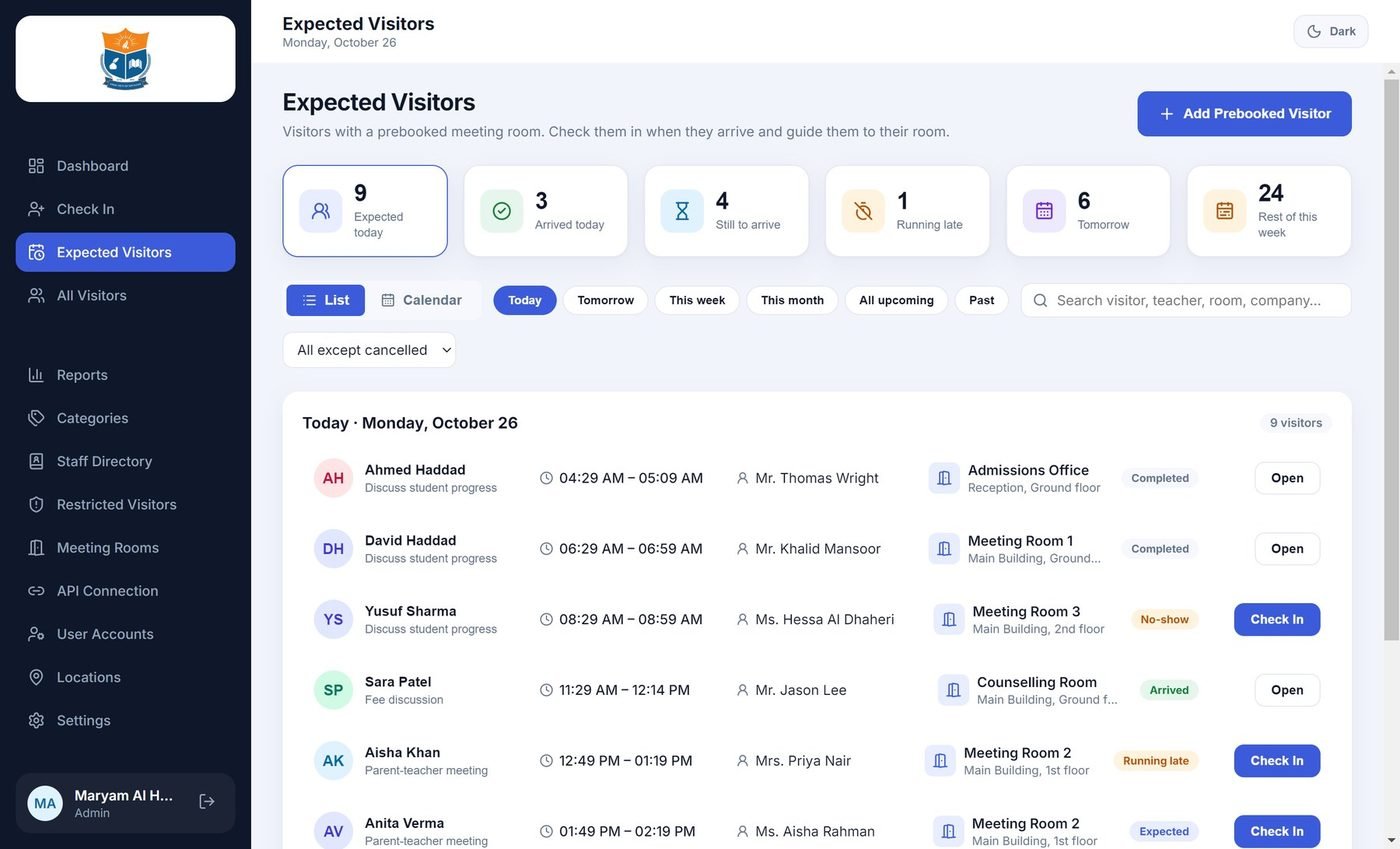
Know who is coming before they arrive.
Appointments show on the front desk list with the room and floor. Visitors who are late or who do not arrive are flagged, and a booking closes automatically once the visit is done.
Live at your gate in four steps.
We look after the setup, so your guards only need to learn the front desk screens.
Install
A standard Windows installer on the reception computer. No cloud account needed.
Add your staff
Import teachers and staff from Excel or CSV, with department and room.
Set it up
Your crest, visitor categories, the restricted list, and optionally the card reader and booking link.
Go live
Guards sign in with their own accounts and check in the first visitor.
Questions schools ask us
Do we need an internet connection or a cloud account?
No. VisitorFlow360 runs on the reception computer and stores data locally. An internet connection is only needed for features such as ICP validation of the Emirates ID.
Do we need a card reader?
No. A PC/SC smart-card reader speeds up Emirates ID check-in, but visitors can also be entered by hand, and passports or other IDs are supported with a photo of the document.
What about visitors without an Emirates ID?
Use the Passport or Other ID tab. The remaining details are the same, and a photo of the document is kept with the visit.
Can the guard and the administrator have different access?
Yes. Administrators manage staff, categories, the restricted list and settings. Guards check visitors in and out.
Can we use our own school logo on the badge and reports?
Yes. Your school crest appears on badges and on the printed visit report.
Can we import our teachers?
Yes, from an Excel or CSV file, including department and room.
How do we get started?
Book a demo and we will show it on a live system. If it fits, we install it on your reception computer and set up your staff list.
Ready to see it?
Book a free demo and we will show the whole journey on a live system.
Book a free demo →